
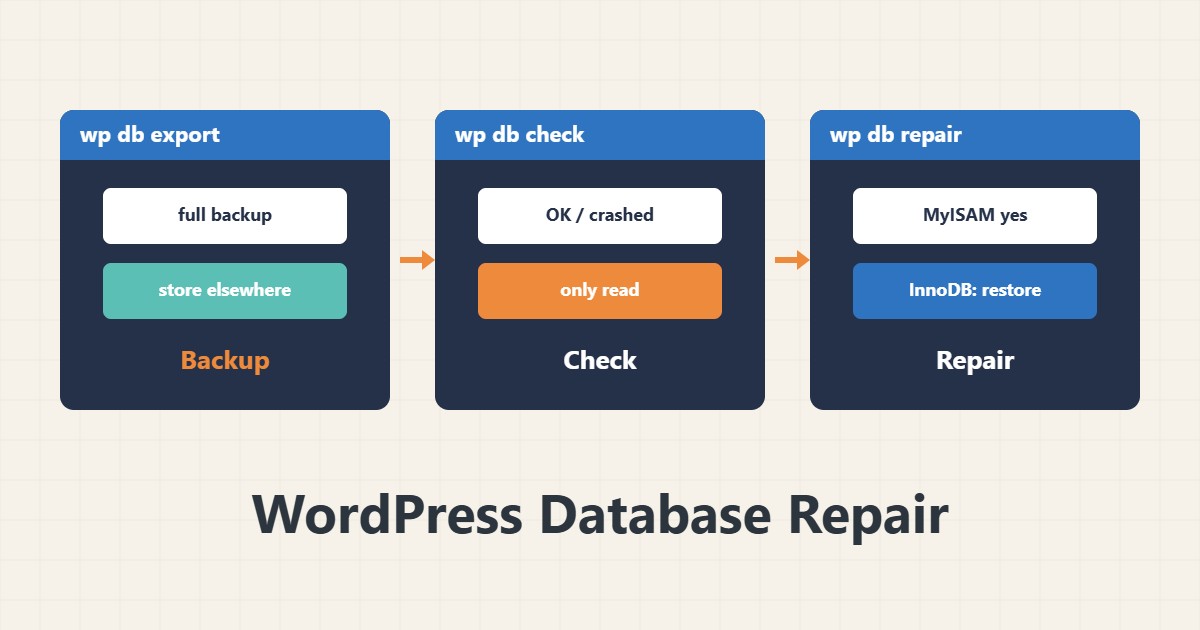
Messages such as “Table is marked as crashed” or database errors on some pages mean a table may be damaged. Repair can help, but without a backup it is risky and it has limits for InnoDB tables. This guide gives the safe order.
1. Back up first
wp db export backup-$(date +%F).sqlBefore any repair, take a full export and keep it somewhere else. If the database is so damaged that export fails, use the last good backup. We have introduced WP-CLI before.
2. Diagnose
wp db checkThis command checks tables with mysqlcheck and reports OK or an error for each. Only damaged tables need action. If WP-CLI is not available, mysqlcheck -c database_name is the equivalent.
3. Repair
wp db repair
wp db optimize
repair is mostly effective for MyISAM tables. REPAIR TABLE is not supported for InnoDB; restoring from backup is usually the main route. Before bigger risks such as innodb_force_recovery you must have file and database backups, and preferably get expert help.
4. The WordPress WP_ALLOW_REPAIR method
define( 'WP_ALLOW_REPAIR', true );This constant enables the page /wp-admin/maint/repair.php. That page is reachable without a logged-in user, so keep it on only briefly and remove the line from wp-config.php immediately after the work. Configuration details are in wp-config.php.
5. Prevention
Table damage usually comes from a power cut, a full disk or a MySQL crash. Monitor disk space, keep tested backups and set up the InnoDB buffer pool properly.
6. Illustrative example, not a measurement
Suppose wp db check flagged a MyISAM log table as damaged. After taking an export, wp db repair fixed it and the site was healthy. This scenario is an invented illustration, not a measurement.
7. Common mistakes
- Repairing without a backup.
- Leaving WP_ALLOW_REPAIR on after the work.
- Assuming REPAIR works for InnoDB too.
- Repairing the database while the disk is full.
8. Frequently asked questions
Does wp db check change anything? No; it only checks.
Is wp db optimize necessary? Not always; for heavily changed tables it may reclaim some space.
What if an InnoDB table is damaged? Restoring from a tested backup is the first option.
9. Quick checklist
- A full export was taken.
- wp db check ran.
- Only the damaged table was repaired.
- WP_ALLOW_REPAIR was removed.
- Disk and backups are monitored.
If you need help reviewing performance or maintaining a server, see the server management services.
More server and WordPress guides are collected in the article archive.
Official references
WP-CLI: wp db check · WP-CLI: wp db repair · MySQL: mysqlcheck