
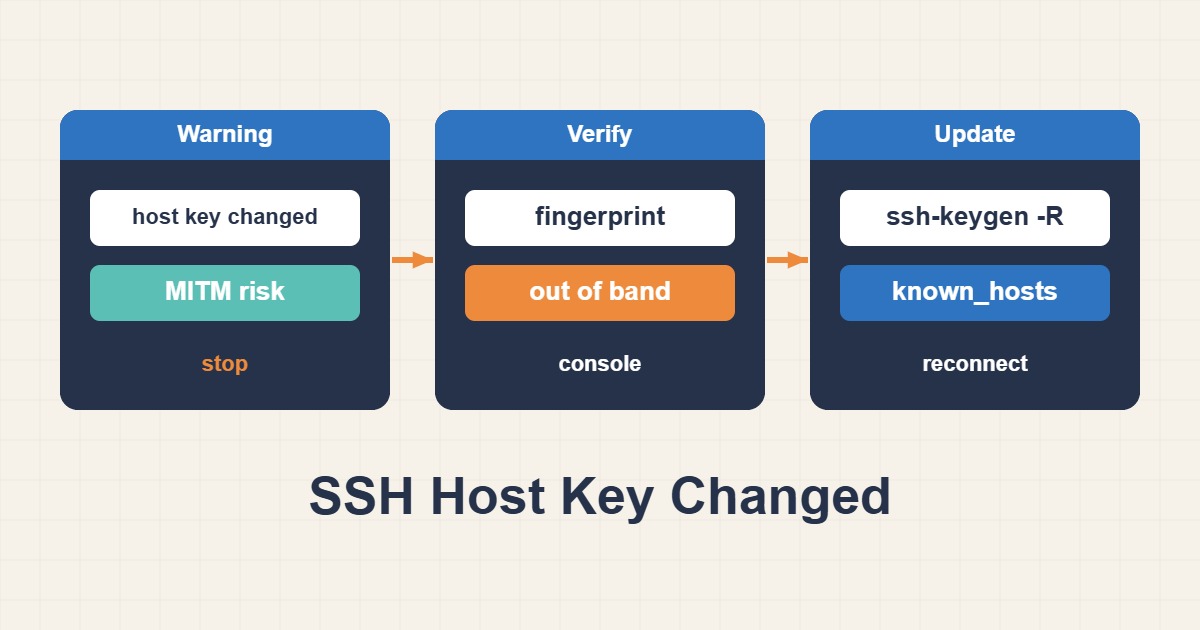
The warning REMOTE HOST IDENTIFICATION HAS CHANGED means the SSH server key presented for a destination differs from a trusted record. A rebuilt server or planned rotation can cause it, but so can an unexpected destination or interception. Deleting the warning without checking identity removes the protection it provides. Keep the connection stopped until the new key has been independently verified.
1. Host keys are not your login keys
A host key identifies the server. Your authorized_keys entry or user private key identifies you to that server. Replacing your personal login key will not resolve a host identity mismatch. Record the hostname, destination IP, port, key algorithm, SHA256 fingerprint and referenced known_hosts file from the warning. Do not share user private keys or server private host keys.
2. Confirm the effective destination and saved entry
ssh -G server.example.com | grep -Ei '^(hostname|port|hostkeyalias|userknownhostsfile|globalknownhostsfile) '
ssh-keygen -F server.example.com -f ~/.ssh/known_hosts
# Nondefault port example:
ssh-keygen -F '[server.example.com]:2222' -f ~/.ssh/known_hosts
Use the same SSH alias you normally connect with; replace the placeholder hostname. ssh -G shows effective client configuration without logging in. Check HostName, Port, ProxyJump, HostKeyAlias and configured known-hosts paths, especially with multiple environments. A reused IP or a wrong DNS answer can send you to a different server. DNS resolution by itself is not proof of identity.
The bracketed hostname-and-port form identifies an entry for a nondefault port. ssh-keygen -F can locate hashed entries, so avoid deleting a guessed line number from the file. If the warning names a managed global file or a custom UserKnownHostsFile, follow its owner’s update process rather than editing another local file and expecting the warning to disappear.
3. Obtain the expected fingerprint independently
# On the server, through an independently trusted console:
sudo ssh-keygen -lf /etc/ssh/ssh_host_ed25519_key.pub -E sha256
Use an already authenticated provider console, a trusted configuration-management record, or an administrator reached through an established separate channel. Confirm that the record refers to the correct server and key algorithm. The example prints the public Ed25519 host key fingerprint; if SSH reports RSA or ECDSA, inspect the corresponding public key instead. Compare the complete SHA256 value, not a few leading characters.
If there is no approved change record or no reliable independent verification path, stop and investigate. Do not log in to the suspect SSH endpoint and then use its output as proof of that same endpoint. Keep the old fingerprint as incident evidence.
4. Understand what ssh-keyscan can and cannot prove
# On the client: observation only, not proof of identity
ssh-keyscan -T 5 -p 2222 -t ed25519 server.example.com > /tmp/server-hostkey.pub
ssh-keygen -lf /tmp/server-hostkey.pub -E sha256
ssh-keyscan collects the key offered over the network. It does not authenticate that key. A man-in-the-middle can also present a key to the scan. Use its result only as an observation to compare with the trusted fingerprint obtained separately. Never pipe its unverified output straight into known_hosts. For port 22, change both the scan port and the entry lookup accordingly.
5. Update only the independently verified entry
# Only AFTER independently verifying the new fingerprint:
cp -p ~/.ssh/known_hosts ~/.ssh/known_hosts.backup-$(date +%Y%m%d-%H%M%S)
ssh-keygen -R '[server.example.com]:2222' -f ~/.ssh/known_hosts
ssh -p 2222 -o StrictHostKeyChecking=ask admin@server.example.com
This example assumes the actual warning refers to ~/.ssh/known_hosts and port 2222. Adapt the file and destination deliberately. If the file does not yet exist, there is no existing entry to replace; investigate a different trust source. ssh-keygen -R removes all key types for the specified destination, not merely one line. Keep the backup and reverify any additional algorithm accepted later.
On reconnection, accept the displayed key only if its algorithm and full fingerprint match the trusted value. Stop on any mismatch. If a separately stored IP entry also triggers a warning, verify that IP as the intended server before updating that entry as well. Do not delete the entire known_hosts database to fix one host.
6. Avoid bypasses and verify the result
- Do not use StrictHostKeyChecking=no or UserKnownHostsFile=/dev/null as an incident workaround.
- Do not regenerate server host keys merely to silence a client warning; it changes the identity seen by every client.
- Do not distribute server private host keys or bake the same private key into unrelated server images.
- For automated jobs, update the reviewed trust record or managed file rather than interactively accepting an unverified key.
After successful verification, confirm the warning no longer occurs, confirm the intended server identity through your inventory, and update monitoring or deployment clients that maintain separate trust records. For larger fleets, planned host-key rotation or SSH host certificates can make trust updates manageable, but their trust roots must also be verified. General access-hardening advice is available in the English article archive.
Official references
OpenSSH ssh-keygen · OpenSSH ssh-keyscan · OpenSSH client configuration