
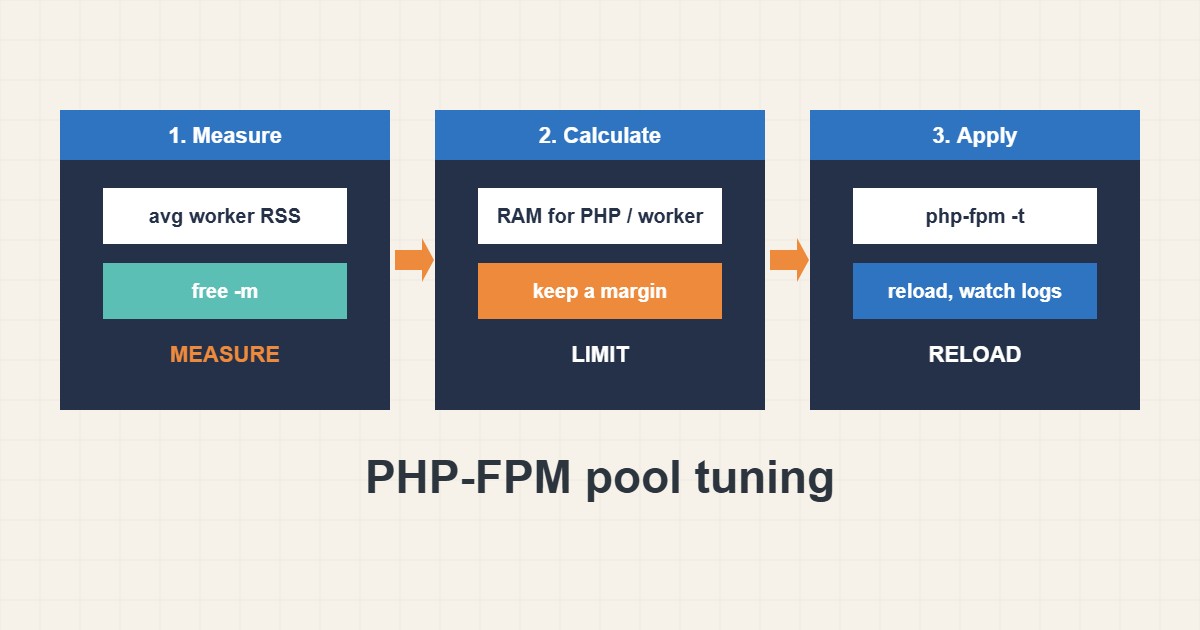
Too few PHP-FPM workers make requests queue and fail with 502 or 504 errors. Too many exhaust memory and the kernel kills processes. The right number comes from measuring how much memory a worker uses and how much RAM you can spare. This guide shows a simple method, a safe starting configuration, how to turn on the slow log and how to reload the service. Commands follow the PHP documentation; I did not run them on your server, and paths and version numbers differ.
1. Measure before you change
Find the average memory per worker and the memory available for PHP after the operating system, the database and the web server take their share:
# Average memory per PHP-FPM worker (MB)
ps --no-headers -o rss -C php-fpm8.2 | awk '{s+=$1;n++} END {printf "workers=%d avg=%.0f MB\n", n, s/n/1024}'
free -m
sudo grep -E 'max children|pm.max_children' /var/log/php8.2-fpm.log | tail -n 5
Measure under normal traffic, because workers grow over time. A WordPress site with many plugins often uses far more per worker than a small script.
2. Calculate a safe maximum
Divide the memory you can give to PHP by the average worker size, then keep some margin. For example, with about 2000 MB available and 80 MB per worker, a limit near 20 leaves room for peaks. This is an illustrative calculation, not a measurement of your server.
3. A safe starting pool
Use the dynamic process manager, set a limit from your calculation, recycle workers regularly and enable the slow log to see which requests take long:
; /etc/php/8.2/fpm/pool.d/www.conf
pm = dynamic
pm.max_children = 20
pm.start_servers = 4
pm.min_spare_servers = 2
pm.max_spare_servers = 6
pm.max_requests = 500
request_terminate_timeout = 60s
slowlog = /var/log/php-fpm-slow.log
request_slowlog_timeout = 5s
Lower pm.max_requests helps against memory leaks in some plugins. The slow log shows stack traces for requests that exceed the threshold, which pairs well with the database checks in the slow query log guide.
4. Test and reload without downtime
Always test the configuration first. A reload keeps running requests alive, while a restart interrupts them:
sudo php-fpm8.2 -t                       # test the configuration
sudo systemctl reload php8.2-fpm
sudo systemctl status php8.2-fpm --no-pager
sudo tail -n 20 /var/log/php-fpm-slow.log
Watch the log for the “max_children reached” warning. If it appears often and memory is still free, raise the limit gradually. If memory is tight, fix slow code or add caching instead; see the TTFB guide.
5. Common mistakes
These settings cause most pool problems:
pm.max_children = 200      ; 200 x 80 MB = 16 GB: the kernel kills processes (OOM)
pm.max_children = 2        ; requests queue and users see 502/504
pm = static with big values on a small VPS
Also remember that the web server must have matching timeouts, otherwise it may give up before PHP finishes.
6. Illustrative example, not a measurement
Imagine a VPS (made-up) with 4 GB of RAM where the site shows 502 errors during traffic peaks. The log says max_children was reached, and workers average about 80 MB. About 2 GB can go to PHP, so a limit near 20 is reasonable. After raising it from 5 to 20 and enabling the slow log, the errors stop and memory stays within bounds.
7. Common mistakes
- Guessing pm.max_children.
- Setting it so high that the server runs out of memory.
- Restarting instead of reloading.
- Ignoring the max_children warning in the log.
- Not enabling the slow log.
- Forgetting matching web server timeouts.
8. Frequently asked questions
What does max_children do? It limits how many PHP workers can run at the same time.
Dynamic, ondemand or static? Dynamic is a balanced default. Ondemand saves memory on quiet sites, and static suits dedicated, busy servers.
How do I know the limit is too low? The log shows max_children reached and users may see 502 or 504 errors.
Does more workers always mean faster? No. After memory runs out, performance gets much worse.
9. Quick checklist
- Measure average worker memory.
- Estimate memory available for PHP.
- Calculate a limit with margin.
- Edit the pool file.
- Run php-fpm -t.
- Reload the service.
- Watch logs and the slow log.
If you need help reviewing performance or maintaining a server, see the server management services.
More server and WordPress guides are collected in the article archive.
Official references
PHP manual: FPM configuration · PHP manual: FastCGI Process Manager · nginx: ngx_http_fastcgi_module · ps(1) manual