
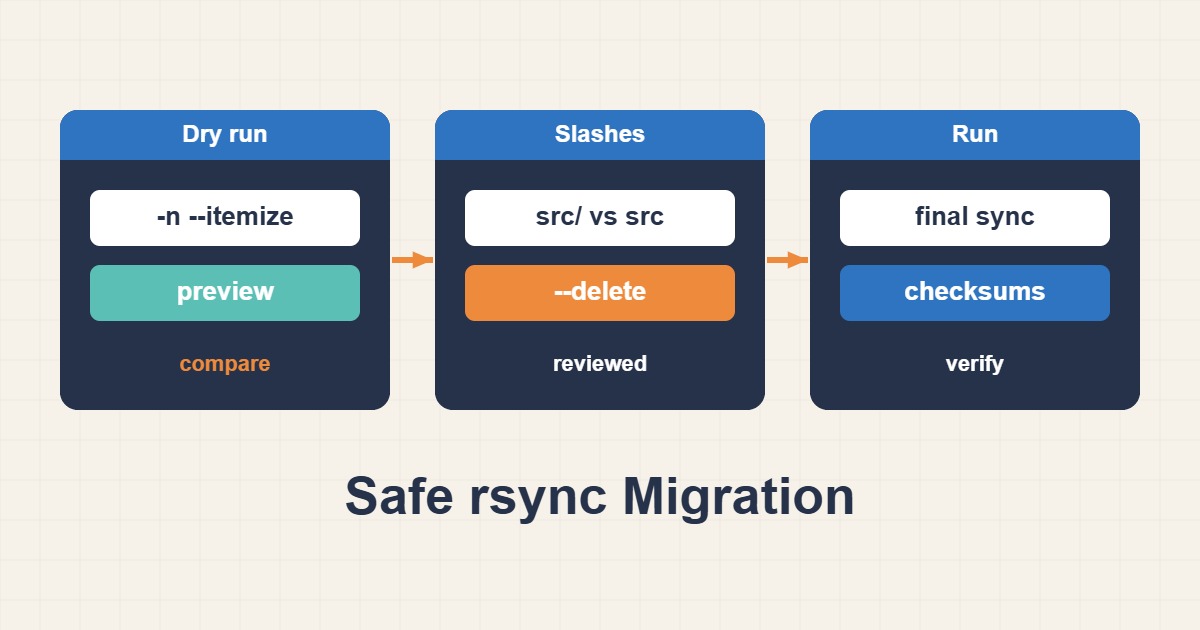
rsync is a powerful transfer tool, but reversed paths or unreviewed –delete can remove valid data. A dry run previews operations; it is not a backup. This guide concerns application or website files, not a live database, queue or session store. Establish paths and permissions first, then perform a controlled cutover with a plan for stopping or reconciling writes.
1. Confirm direction, identity and scope
The sample source is /srv/site/ and the destination is deploy@new.example.com:/srv/site/. Replace both deliberately. Verify the SSH host identity independently rather than accepting a changed key blindly. Use a dedicated destination without unrelated service files. Check write permission, free capacity and symlink policy. Do not assume running every transfer as root is the correct solution to permission errors.
2. Understand trailing slashes and archive mode
A trailing slash on the source means its contents are copied; without it, the directory itself may be added beneath the destination. Verify the layout in the dry run and keep the exact reviewed command. -a preserves many archive attributes, but does not automatically include hard links, ACLs or extended attributes. Choose -HAX only when required and supported on both ends. Ownership preservation also depends on receiver privileges and matching identity policy across servers.
3. Dry-run, then copy without deletion
Review itemized output for unexpected paths, permissions and transfer direction. A dry run does not transfer the payload or predict every disk error or concurrent change. After approval, execute the same options without –dry-run. Inspect the exit status and warnings rather than treating any output as success. Vanished or changing files may show the application is still writing during the copy.
rsync -a --dry-run --itemize-changes --   /srv/site/ deploy@new.example.com:/srv/site/

# After reviewing the preview:
rsync -a --itemize-changes --   /srv/site/ deploy@new.example.com:/srv/site/
4. Review deletion as a separate mirror decision
–delete removes extra receiver-side files within the synchronized scope; it is not appropriate for merging independent datasets. Before deletion, have an independent destination backup and know which files exist only there. Preview with exactly the intended include/exclude rules and review every deleting entry. Remove –dry-run only after explicit approval. –delete-excluded has different consequences and should not be added as a vague cleanup option.
# Preview deletion ONLY; this command does not delete files.
rsync -a --delete --dry-run --itemize-changes --   /srv/site/ deploy@new.example.com:/srv/site/
5. Finish cutover and content verification
Perform an initial transfer while serving, then stop writes in a controlled window and run the final pass. Migrate the database with a consistent dump/restore or service-specific method, not raw files from a running database engine. A later –checksum dry run can detect content differences more thoroughly but costs I/O and does not replace a backup. Test application permissions, assets and critical routes at the destination. Keep the source until acceptance. If the destination has accepted new writes, simply switching DNS back may lose data: stop writes and reconcile changes before rollback.
# Verification preview after the controlled final sync:
rsync -a --checksum --dry-run --itemize-changes --   /srv/site/ deploy@new.example.com:/srv/site/