
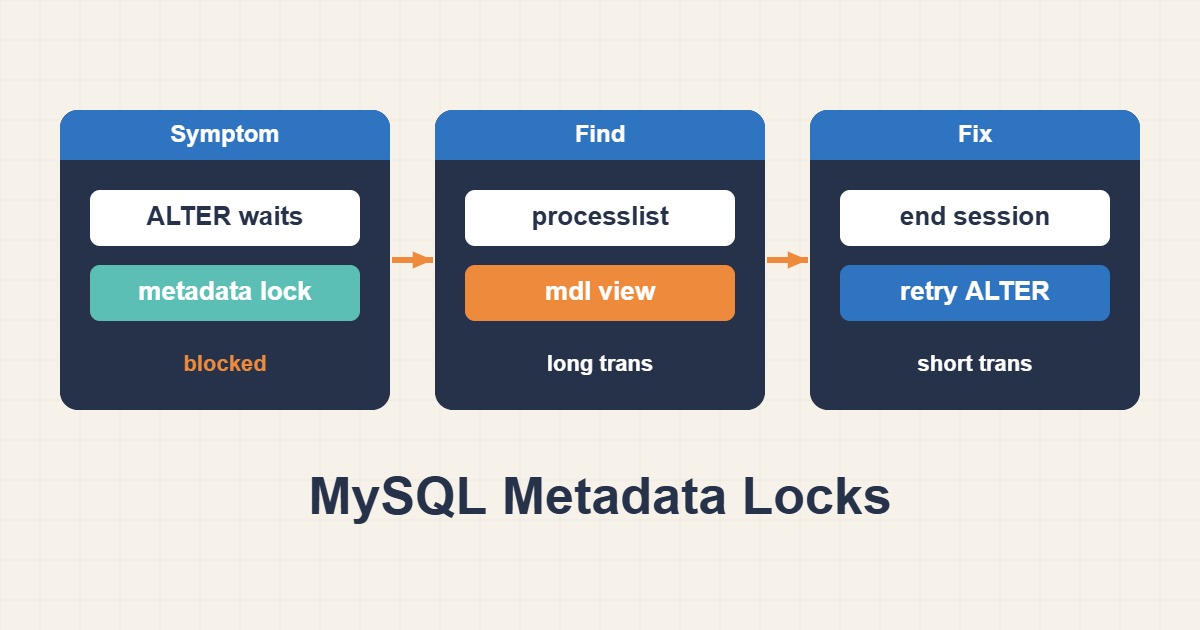
An ALTER TABLE can appear frozen even when CPU usage is low. The blocker may be a transaction that read the table and then went idle, rather than an expensive query. MySQL protects object definitions with metadata locks, so an unfinished transaction can prevent a schema change. This guide targets MySQL 8.0 and 8.4; MariaDB and older versions require their own checks.
1. Separate metadata locks from InnoDB row locks
Row locks protect records being modified. Metadata locks protect object definitions and their consistency during concurrent access. An explicit transaction that only performs a SELECT may retain table metadata locks until it ends. Even a sleeping session can therefore block DDL. Do not equate low CPU or an empty current query field with an inactive transaction.
A pending exclusive DDL lock can also contribute to a queue of later operations on that table. Treat a schema deployment that increases application latency as an incident to investigate, not a reason to launch more ALTER attempts. Online or instant DDL does not mean there is no metadata locking.
2. Identify the waiting and blocking sessions
SELECT VERSION();
SHOW FULL PROCESSLIST;
SELECT object_schema, object_name,
       waiting_pid, waiting_query_secs, waiting_query,
       blocking_pid, blocking_account, blocking_lock_type
FROM sys.schema_table_lock_waits
ORDER BY waiting_query_secs DESC;
The sys view reports the waiting processlist ID and blocking processlist ID. One waiting session may have multiple blockers; retain every row. Correlate IDs with the account, host, deployment and transaction age. Use an authorized diagnostic account with sufficient visibility. Missing results can reflect privileges or instrumentation, not proof that the lock is absent.
3. Inspect the transaction and underlying locks
SELECT trx_mysql_thread_id, trx_started, trx_state, trx_query
FROM information_schema.innodb_trx
ORDER BY trx_started;

SELECT ml.OBJECT_SCHEMA, ml.OBJECT_NAME,
       ml.LOCK_TYPE, ml.LOCK_DURATION, ml.LOCK_STATUS,
       th.PROCESSLIST_ID, th.PROCESSLIST_USER, th.PROCESSLIST_INFO
FROM performance_schema.metadata_locks AS ml
LEFT JOIN performance_schema.threads AS th
       ON th.THREAD_ID = ml.OWNER_THREAD_ID
WHERE ml.OBJECT_TYPE = 'TABLE'
  AND ml.OBJECT_SCHEMA = 'appdb'
  AND ml.OBJECT_NAME = 'orders';
Replace appdb and orders with the affected schema and table. In metadata_locks, GRANTED indicates a held lock and PENDING an ungranted request. The thread join provides a processlist ID; do not confuse an internal THREAD_ID with the ID accepted by KILL. A held lock is not automatically the relevant blocker: compare lock modes and use the sys relationship when available.
If instrumentation is unavailable, inspect the wait/lock/metadata/sql/mdl instrument in performance_schema.setup_instruments and coordinate any change with the database administrator. Do not enable all Performance Schema collection indiscriminately. If PROCESS privilege is unavailable, you may not see another account’s transactions; ask for a permitted diagnostic session rather than guessing.
4. Resolve the wait with the least disruption
- If the DDL is optional and its wait is building a queue, cancel the waiting migration through its owner or deployment tool first.
- Ask the blocker’s application owner to finish the transaction deliberately: COMMIT only if its changes should be saved, ROLLBACK if they should be discarded. Those commands must execute in the owning session.
- Do not use KILL QUERY on an idle blocker and assume the transaction ended; cancelling a statement does not necessarily terminate its transaction.
- Use KILL CONNECTION only after confirming the current process ID, authority, business impact and recovery plan. Closing a connection can roll back uncommitted work and rollback may take time.
5. Bound the migration’s wait, not the entire server
-- In the migration connection, before the reviewed DDL:
SET SESSION lock_wait_timeout = 10;
This example limits metadata-lock waiting in that session; it is not a guaranteed ten-second bound on the entire ALTER operation. Choose a value appropriate for your deployment and client timeout. innodb_lock_wait_timeout addresses InnoDB row-lock waits and is not the substitute for metadata-lock wait policy. Avoid changing global limits during an incident without understanding all applications.
6. Reproduce safely in a disposable lab
-- Lab only: disposable database and table
CREATE DATABASE mdl_lab;
CREATE TABLE mdl_lab.demo (id INT PRIMARY KEY);
INSERT INTO mdl_lab.demo VALUES (1);

-- Session A
START TRANSACTION;
SELECT * FROM mdl_lab.demo;
-- Leave this transaction open briefly.

-- Session B, separate connection
SET SESSION lock_wait_timeout = 5;
ALTER TABLE mdl_lab.demo ADD COLUMN note VARCHAR(50);

-- Session A, after observing the wait
ROLLBACK;
Run the two sessions manually in a nonproduction lab. The ALTER may time out before Session A ends; if so, retry it only after releasing the transaction. Verify the actual table definition with SHOW CREATE TABLE mdl_lab.demo before retrying. If it already succeeded, adding the same column again will fail. Never use your production orders table to demonstrate this behavior.
7. Confirm recovery and prevent recurrence
Check that the waiting sessions clear, that the application’s latency and error rate return to normal, and that the intended schema is present. Watch transaction age after the incident. Keep transactions short, close them reliably on exception paths, and avoid user interaction or slow network calls inside an open transaction. Test migration lock behavior against realistic load, with a backup and a controlled release window.
A restart may disconnect clients and hide the original evidence; it is not the first diagnostic step. If the problem is instead a row-lock deadlock, use the separate troubleshooting guide from the English article archive.
Official references
MySQL metadata locking · sys.schema_table_lock_waits · Performance Schema metadata_locks