
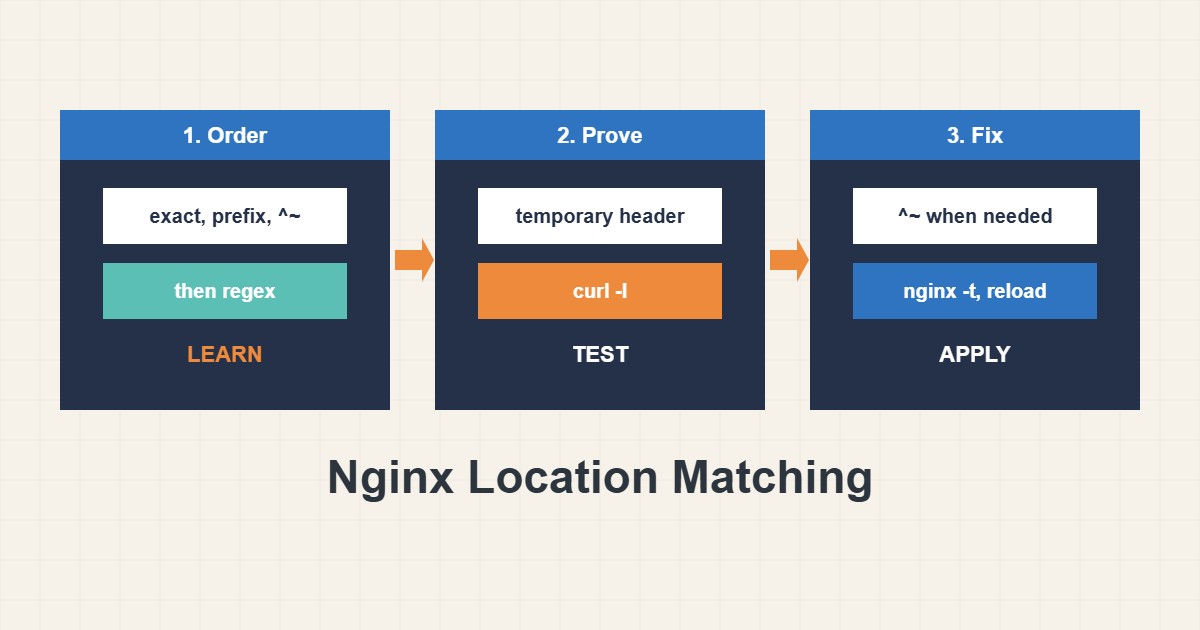
When an Nginx rule “does nothing”, the usual reason is that a different location block handled the request. Nginx does not read locations from top to bottom the way many people expect. It follows a specific order that mixes exact matches, longest prefixes and regular expressions. Once you know that order, most surprises disappear. This guide explains it in plain terms, shows how to prove which block served a URL, and lists the mistakes that cause static files, PHP and proxies to behave unexpectedly.
1. The matching order in one picture
For each request Nginx follows these steps. First it looks for an exact match (location = /path); if found, it stops. Otherwise it finds the longest matching prefix location. If that prefix has the ^~ modifier, it stops there. If not, it tests the regular expression locations (~ case sensitive, ~* case insensitive) in the order they appear in the file, and the first regex that matches wins. If no regex matches, the longest prefix is used. Here is an example with the four kinds:
server {
    listen 80;
    server_name example.com;

    location = /health { return 200 "ok\n"; }        # 1. exact
    location ^~ /assets/ { root /var/www/static; }     # 2. prefix, stops regex search
    location ~* \.(jpg|png|css|js)$ { expires 7d; }    # 3. regex (first match wins)
    location / { try_files $uri /index.php?$args; }    # 4. fallback prefix
}
A request for /assets/app.css goes to the ^~ block, not the regex block, even though it ends in .css.
2. Why a regex block steals requests
Regex blocks are checked after a plain prefix match, so a broad regex can take a request that you meant to serve from a specific prefix:
location /uploads/ { root /var/www/site; }
location ~* \.(jpg|png)$ { expires 30d; }   # also matches /uploads/a.jpg and wins
A file under /uploads/ ends in .jpg, so the regex block wins and the root from the prefix block is never used. If you want the prefix to win, add ^~ to it. This single rule explains many “my static files return 404” reports.
3. Prove which block served the request
Do not guess. Test the configuration, list the blocks and add a temporary marker header to the one you are checking:
sudo nginx -t
sudo nginx -T 2>/dev/null | grep -nE 'server_name|location '

# Temporary marker header per block (remove after testing)
location /api/ { add_header X-Matched "api" always; proxy_pass http://127.0.0.1:9000; }
Then request the URLs and look for the header:
curl -sI http://example.com/health | head -n 3
curl -sI http://example.com/assets/app.css | grep -i x-matched
curl -sI http://example.com/api/v1/items | grep -i x-matched
Remove the debug header afterwards, and reload only after nginx -t succeeds. On a production server make the change in a copy of the file or at a quiet time.
4. Common causes of surprises
Nested locations behave differently from top-level ones: a regex block inside a prefix block is only considered for requests that matched that prefix. A missing or extra trailing slash changes the match and, with proxy_pass, the forwarded path. A try_files fallback to /index.php triggers a new internal search, so a PHP regex block may then take the request. Remember that if inside a location has quirks and should be used sparingly. For permission problems after the right block is found see the 403 guide for hosting-specific causes.
5. Keep configuration readable
Group exact and special locations first for humans, even though order only matters for regex. Put comments next to rules that depend on the order. Keep static file rules narrow, and avoid one giant regex for everything. For HSTS and headers placed per location, remember that add_header in a child block can replace inherited headers; see the HSTS guide.
6. Illustrative example, not a measurement
Imagine a site where files under /uploads/ must be served from a special folder, but they keep returning 404 (made-up case). The configuration has a prefix block for /uploads/ and a regex block for images with caching. Adding the marker header shows that the regex block served the request, so the prefix block’s root was ignored. Changing the prefix to ^~ /uploads/ fixes it, and the marker header proves the new behavior before you remove it.
7. Common mistakes
- Assuming locations are read from top to bottom.
- Forgetting that a regex can override a prefix.
- Leaving debug headers in production.
- Reloading before running nginx -t.
- Nesting regex blocks without understanding scope.
- Changing trailing slashes without testing proxy paths.
8. Frequently asked questions
Does the order of prefix locations matter? No. Nginx picks the longest matching prefix regardless of order.
Does the order of regex locations matter? Yes. The first regex that matches wins.
What does = do? It makes an exact match and is checked first. It is also very fast, so it suits health checks.
Can I test without reloading? Use nginx -t for syntax, then reload and check with curl. A copy of the config on a test server is safer.
9. Quick checklist
- Run nginx -t before any change.
- List the location blocks with nginx -T.
- Add a temporary marker header.
- Request the URL with curl.
- Use ^~ when a prefix must beat regexes.
- Remove debug headers.
- Reload and re-test.
If you need help reviewing performance or maintaining a server, see the server management services.
More server and WordPress guides are collected in the article archive.
Official references
nginx: location directive · nginx: How nginx processes a request · nginx: Beginner’s Guide · nginx: ngx_http_headers_module